

Why Wallet Choices Matter for Organizations in 2026
If your users or employees use crypto, their wallet is now part of your risk. Even if you never touch a coin yourself.
In 2026, people can pick from many wallet types, like hot, cold, custodial, non‑custodial, and hardware wallets such as a hardware wallet crypto device for long term storage. Each one has different risks and trade‑offs for safety, control, and ease of use, and the “best wallet” will change with the use case and the user’s skill level.
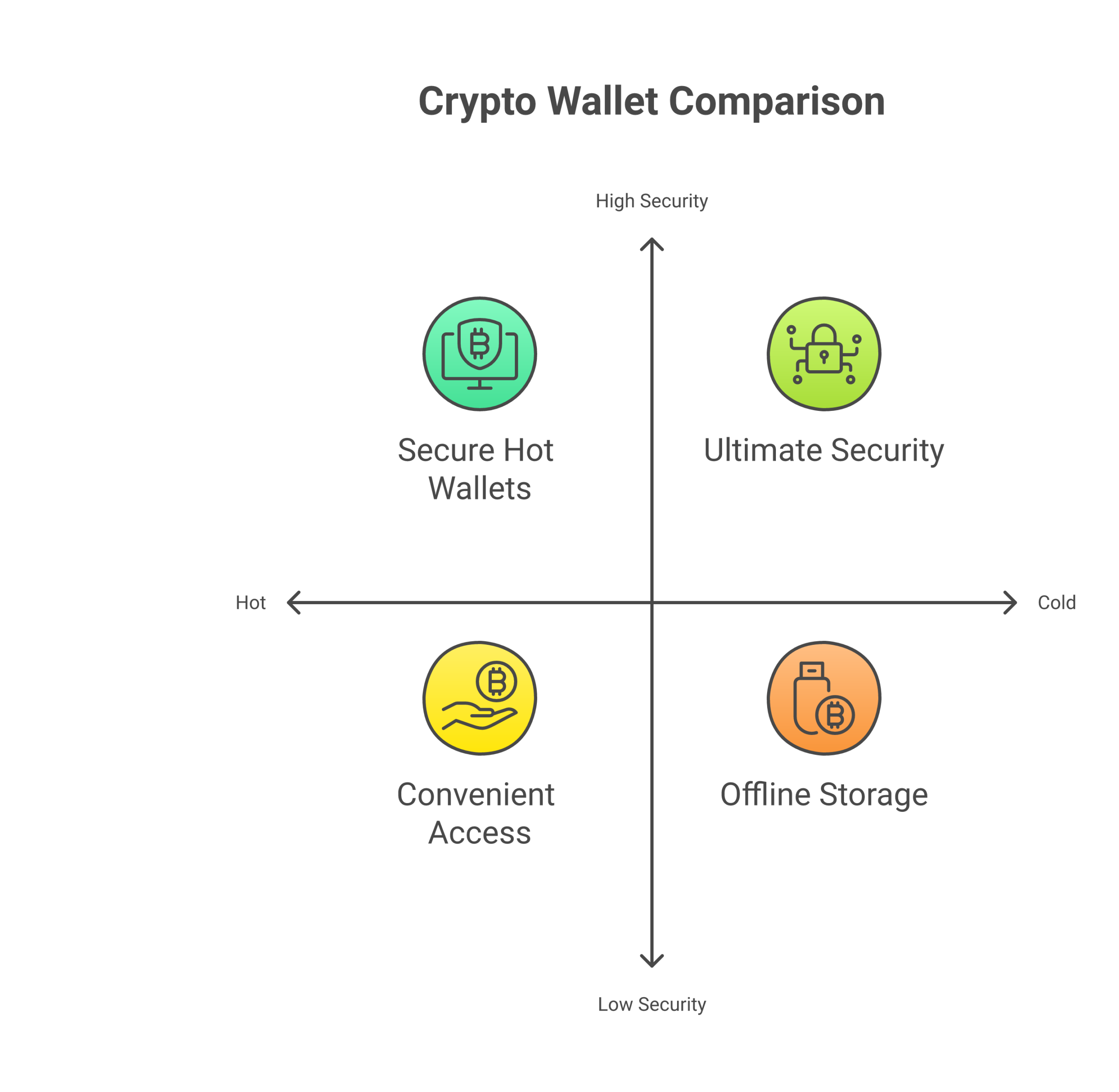 ¹ When users guess, or copy a friend, they often pick a poor setup for what they are trying to do.
That is where the trouble starts for your business.
User wallet mistakes hit your bottom line
Most platform and employer losses do not come from smart hackers breaking core systems. They come from basic user errors, such as:
- Sending funds to the wrong address
- Storing seed phrases in email or chat
- Falling for fake “support” that asks for keys
- Using only a hot wallet on a phone for large balances instead of a safer cold wallet crypto setup like a hardware wallet
For exchanges, apps, and Web3 projects, these mistakes often turn into:
- Huge spikes in support tickets and live chat load
- Pressure to “make users whole” after fraud
- Social media storms, bad reviews, and churn when users blame the platform, even if the wallet was their own
For employers and financial firms, it can mean:
- Staff hit by scams while dealing with clients
- Clients who get wiped out in a personal wallet and lose trust in the adviser or brand
- Extra compliance and audit headaches as regulators push for better user education around digital asset risk and controls²
In short, weak wallet choices by individuals can create big, unfair costs for the organizations that serve them.
Clear wallet education turns risk into ROI
The good news is that wallet risk is very teachable. Just like general security awareness training can cut incident rates and show a clear return on investment,³ simple, standard crypto wallet education can do the same.
When you give people:
- A plain guide on how to use a crypto wallet, step by step
- Simple rules for when to use a hot wallet, when to use a hardware wallet crypto device, and when a custodial wallet is safer
- Clear policies on who holds keys in your custody model, and how your support team will (and will not) interact with wallets
you reduce avoidable loss, support your regulatory story, and build trust.
You do not need to turn every user into an expert in ledger wallet internals, Trezor wallet menus, Phantom wallet setup, or top 10 crypto wallets across chains. You do need a clear standard that fits your product, your risk level, and your users’ skills.
That is where focused education partners can help. A service like Shield My Crypto is built to teach normal people how to protect wallets, seed phrases, and accounts in simple language, so your team does not have to write everything from scratch.
If you want ongoing, beginner friendly help that you can also share with staff or clients, it can be useful to point them to a trusted education source. The free Clicks and Trades newsletter gives step by step crypto safety tips, including how to pick a safer wallet setup, without heavy jargon. It can support your own training and reduce “how do I keep this safe?” questions over time.
When you are ready to bring more structure to your organization’s crypto safety education, you can also invite your team or clients to Sign Up for more guided resources and updates that keep pace with 2026 threats and wallet options.
Wallet Fundamentals: Keys, Addresses, and Custody Models
If your team does not share a basic picture of how wallets work, it is very hard to set good rules. Let us fix that first.
Wallets hold keys, not coins
Crypto is not inside a wallet app or a hardware wallet crypto device.
Your coins live on the blockchain. The wallet just:
- Stores secret numbers, called private keys
- Shows public addresses tied to those keys
- Lets you sign and send transactions
As one 2026 guide puts it, a crypto wallet is a tool, app, or device that stores keys and lets you approve transactions, the assets stay on chain, not “inside” the wallet app itself.[^rockwallet]
So when someone moves from a phone wallet to a hardware wallet crypto setup, like a Nano Ledger X or a Trezor wallet, they are really moving control of their keys, not moving “coins” in the way people move cash between bank accounts.
 This small idea matters a lot for policy:
- If your staff control the keys, they control the funds
- If a third party holds the keys, that party controls the funds
- If keys are lost, or shared with a scammer, no one can “undo” it
Addresses: public IDs that point to keys
A wallet can show many public addresses. These are like account numbers.
- Each address is tied to a private key
- Anyone can send funds to an address
- Only the holder of the matching private key can move those funds out
Modern wallets, like Phantom wallet, Ledger wallet apps, or a crypto.com wallet, often hide this detail. They show a simple list of balances across chains. For users this is easy, but for your risk team it can blur where control really sits.
When people ask how to use a crypto wallet safely, a clear rule helps:
- “Never share your private key or seed phrase”
- “It is safe to share your public address”
That one idea can block many “fake support” scams at the source.
Seed phrases and HD wallets: one backup, many accounts
Most current wallets are HD wallets, short for hierarchical deterministic. This sounds complex, but the core idea is simple:
- You write down one seed phrase
- That seed can create many private keys and addresses
- Apps like Ledger Nano X crypto wallet, Trezor, Tangem wallet, and others all follow this pattern
The seed phrase is your master backup. If the phone, browser, or hardware wallet breaks, you can type that phrase into another wallet, like a channel wallet app or even a competing tool from the list of top 10 crypto wallets, and get all those keys back.[^changelly]
This is good for:
- Easy device upgrades
- Running the same wallet on phone and desktop
- Staff who need a spare hardware wallet crypto device in a safe place
It also creates a single point of total failure:
- If someone copies the seed phrase, they can empty every linked address
- If a user stores the phrase in email or chat, that email account is now a direct path to all funds
- If the phrase is lost, no one, not your support team, not the chain, can restore it
For any organization, this should drive clear standards on:
- Where seed phrases are allowed to be written
- How they are stored or split
- Who may see them under what conditions
Training must repeat one simple idea: “Seed phrase equals full wallet control.”
Custodial vs non‑custodial: who really holds the keys
Once you see that “keys equal control,” custody models get easier.
Most setups in 2026 fit one of these:
-
Custodial wallets
- A company, like an exchange, holds the keys
- Users see balances and can request withdrawals
- The business must manage compliance, access control, and audits
- Good for simple users, but higher duty of care for you as the provider
-
Non‑custodial wallets
- The user holds the keys directly
- This can be a browser wallet, mobile app, or hardware wallet crypto device
- The user is fully responsible for backups and safety practices
Modern guides explain that wallets can also be hot (online), cold wallet crypto (offline), or hybrids, and that the best choice depends on risk and skill level.[^bleap] Your internal standards can mix these:
- Custodial hot wallets for fast trades or small balances
- Non‑custodial hardware devices for treasury or client assets
- Extra layers like proof wallets or multi‑sig for higher value accounts
For example, a client might start by buying on an exchange like Luno, then later move from Luno to hardware wallet storage for long term holds. Others may choose the “best wallet” from reviews like “best hardware wallet Safemoon” or “best hardware wallet 2021 UK,” even when that is not the right fit for your risk model.
What matters for your organization is not the marketing label. It is your clear answer to “who has the keys at each step.”
Why this matters for your policies and training
Once leaders understand keys, addresses, seed phrases, and custody, you can write better rules for:
- When a custodial setup is safer than a DIY app
- Which teams must use a hardware wallet crypto device for any company funds
- How to separate day to day hot wallets from long term cold wallet crypto storage
- What your staff may say when users ask about tools like Phantom wallet, crypto wallet Trezor, Ledger Nano applications, Secrid wallet card holders, or even “bitcoin faucets direct to wallet” offers that may hide scams
It also helps you explain, in plain words, why support cannot ask for a seed phrase, and why some “fixes” are simply impossible if a user shares it.
If you want to give your team or clients easy, friendly lessons on these basics, the free Clicks and Trades newsletter can help. It breaks down ideas like keys, phrases, and hardware storage into short tips people will actually read, which lowers your “start from zero” load.
When you are ready to fold these wallet fundamentals into a simple, repeatable education plan for staff or clients, you can invite them to Sign Up for more step by step safety guides and updates that keep up with new wallet types and custody tools in 2026.
[^rockwallet]: See this clear breakdown of how wallets store keys rather than coins in a 2026 beginner guide on the best crypto wallets in 2026.
[^changelly]: For a simple overview of HD wallets and how one seed phrase can control many addresses, see this intro to crypto wallet types for beginners.
[^bleap]: For a 2026 view of hot, cold, custodial, and non‑custodial wallets, see Types of Crypto Wallets Explained.
Hardware vs. Software vs. Cold Storage: Match the Model to the Risk
If your team treats all wallets the same, risk gets blurry fast. The tool you pick should match the kind of danger you face, not just what feels easy.
At a high level, most setups you will use are:
- Hot software wallets
- Hardware wallet crypto devices
- Deep cold wallet crypto storage
Modern guides explain that these sit on a spectrum, from fast and online to slow and very hard to hack.[^types1]
The right mix starts with a simple threat model.
Step 1: Know the main threats
For day to day users and teams in 2026, three wallet risks show up again and again:
-
Endpoint compromise
- Laptop or phone gets malware
- Screen sharing or remote access tools see what staff type
- Browser extensions grab wallet data
-
Phishing and fake support
- Staff click a fake “Ledger wallet” or “Phantom wallet” page
- Someone asks for a seed phrase or “reset code”
- Users follow “bitcoin faucets direct to wallet” promos that steal keys
-
Mis sending funds
- Copy paste of the wrong address
- Pick the wrong network in a crypto.com wallet or channel wallet
- Staff send from Luno to hardware wallet using a bad QR code or fake contact
Your choice of hardware versus software should answer one simple question:
“Which of these risks hurts us the most, and how much friction can we live with?”
 ### Hot software wallets: speed and UX, higher attack surface
Hot wallets are apps that keep keys on internet linked devices:
- Browser add ons, like a Phantom wallet style tool
- Mobile apps in the “top 10 crypto wallets” lists
- Exchange apps that hold keys for you
They are great when:
- Staff need to move fast
- Balances are small
- Users learn how to use a crypto wallet and just test things out
They are weaker when:
- The same laptop runs risky downloads
- Staff reuse passwords on many sites
- People handle client funds from chat and email heavy devices
Hot wallets are more exposed because the keys, even if encrypted, live on an always online system.[^types2] For most orgs, this calls for clear caps:
- Use hot wallets only for small, daily flow
- Never park treasury or long term client funds in them
- Tie them into phishing and URL check training
The free Clicks and Trades newsletter can help here, since it gives short, non technical tips you can build into these basic “hot wallet rules of thumb.”
Hardware wallets: less exposed keys, more friction
A hardware wallet crypto device, like a Ledger Nano X crypto wallet or a Trezor wallet, holds keys in a small, sealed device. The device:
- Creates and stores keys inside secure hardware
- Signs transactions inside the device
- Only shares signed data with the phone or laptop, not the raw keys
This cuts endpoint risk, since malware on the laptop cannot just read or copy the keys.[^types3] It does not fix every problem, though:
- People can still sign a bad transaction if they trust a fake site
- Staff can still send to the wrong address
- Seed phrases can still be stolen if stored badly
So for hardware, teach your team:
- Treat seed phrases like full control, just like you learned in the last section
- Double check addresses on the device screen, not only on the laptop
- Use separate devices for test funds and for high value funds
Hardware works best for:
- Business treasury
- Client assets that must pass audits
- Any pool where you want proof wallets, sign off rules, and slower moves
If your team runs support, a simple guide that names when to move from Luno to hardware wallet, or how to talk about “best hardware wallet Safemoon” and old “best hardware wallet 2021 UK” posts, can cut confusion and risky advice.
True cold storage: keys off the grid
Cold wallet crypto storage keeps keys fully offline:
- Hardware device in a safe, rarely plugged in
- Paper or steel backup of a seed phrase in secure storage
- Split backups, where parts of a phrase sit in different sites
Cold storage works when:
- You move funds very rarely
- You can wait for many checks and sign offs
- You can track where every backup lives
This kind of setup is slow, but it gives your highest safety for simple key theft.[^types4] It is a good fit for:
- Corporate treasury
- Long term reserves that back a token
- Assets that must meet strong key management rules
Here, lessons from classic key management, like split control and clear policy documents, can help your team design storage that matches standards, not just crypto hype.[^nistkeys]
Match models to risk, not to hype
To turn this into policy, try a simple table for each use case.
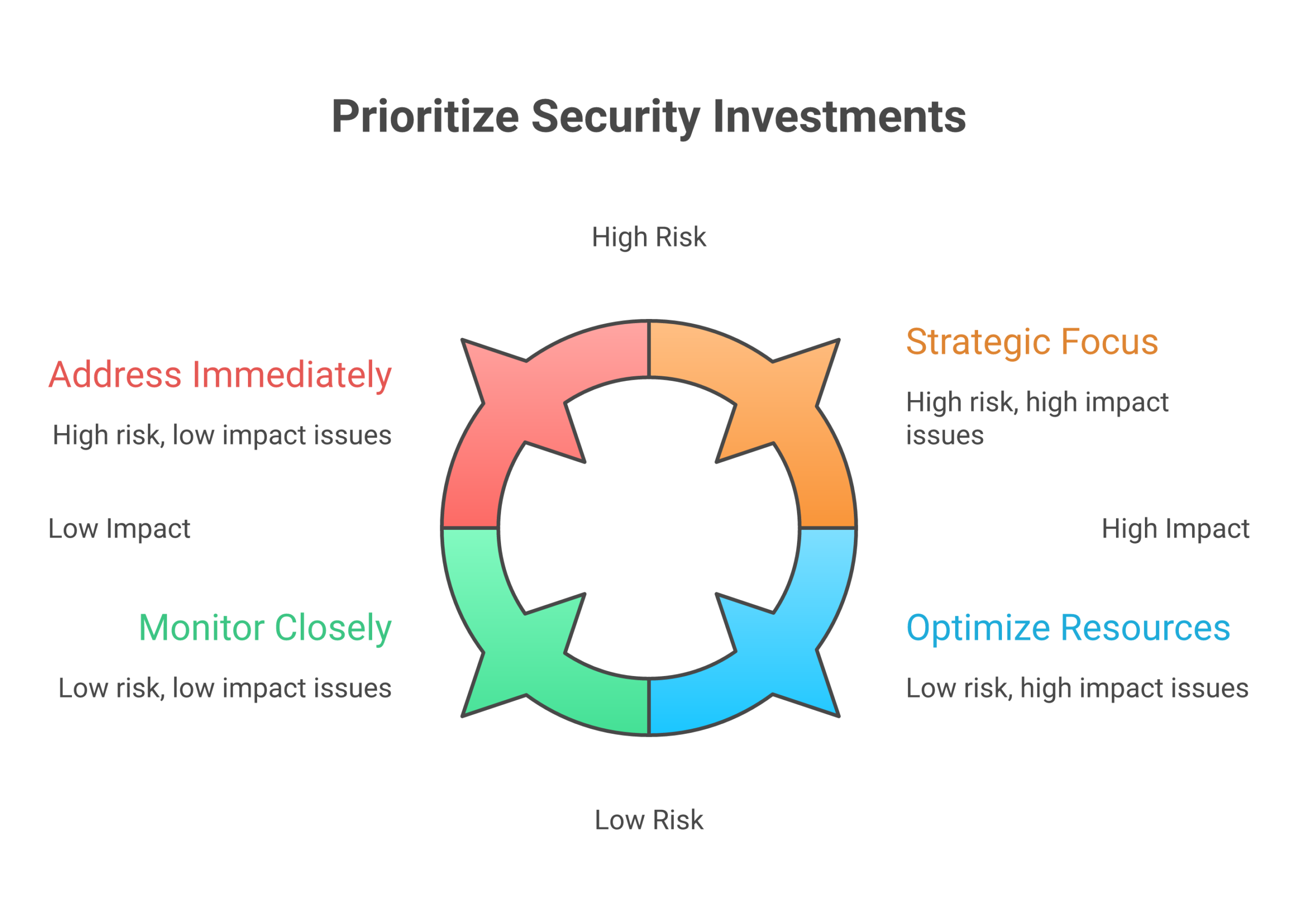 | Use case | Main threats | Good fit | Notes |
| — | — | — | — |
| Small daily trades | Phishing, mis send | Hot software wallet | Low caps per wallet |
| Staff demo or test funds | Mis send, fake sites | Hot wallet with tiny limit | Clear “demo only” tags |
| Client payouts and refunds | Phishing, endpoint, access misuse | Hardware wallet crypto device | Two person checks for sends |
| Treasury and reserves | Insider abuse, theft, loss | Hardware + cold storage mix | Split backups, clear sign off rules |
Your policies can then say:
- “Hot wallet only” for flows under a set dollar cap
- “Must use Ledger wallet or crypto wallet Trezor device” for mid size pools
- “Must move to deep cold” for anything above a set limit
Education is the glue here. It is not enough to hand someone a Nano Ledger X or Tangem wallet and hope. They need simple, step by step use rules and stories of what goes wrong.
If your team does not have time to build all that from scratch, you can lean on friendly, ready made content. The free Clicks and Trades newsletter is one easy way to give staff and clients steady, simple lessons on hot wallets, hardware, and cold storage without drowning them in jargon. When you want to roll this into your own program, you can also invite them to Sign Up for more structured, step by step safety guides that you can plug into your training plans.
[^types1]: For a clear 2026 overview of hot, cold, hardware, and software wallets, see this guide to crypto wallet types for beginners.
[^types2]: A 2026 overview of wallet types notes that hot wallets trade some security for speed and ease, which is fine only when limits match the risk level you accept.https://cryptodaily.co.uk/2026/03/types-of-crypto-wallets-choose-the-right-one-in-2026
[^types3]: A broad survey of wallet options in 2026 highlights that hardware devices isolate keys from general purpose systems, which sharply cuts common malware and key theft paths.https://www.bleap.finance/blog/all-kinds-of-crypto-wallets
[^types4]: Current wallet guides agree that cold storage, when done well, offers the highest protection from online attacks, at the cost of ease of access.https://www.mexc.com/news/969813
[^nistkeys]: NIST’s key management guidelines stress strong control of key storage and use, which lines up with how careful you must be with hardware and cold storage setups.https://csrc.nist.gov/projects/key-management/key-management-guidelines
Hardware Wallets Deep Dive: Architecture, Safeguards, and Real World Pitfalls
If a hot app is like a daily backpack, a hardware wallet crypto device is closer to a safe. It is still small and easy to carry, but the inside works very differently.
To use it well, it helps to know what is inside the device, and what can still go wrong in real life.
How hardware wallets keep keys safer
Most good hardware wallets, like a Ledger wallet or a Trezor wallet, follow the same basic ideas that banks and card firms use for card chips.
 Security groups such as NIST say that signing keys should be generated, stored, and used inside strong, separate devices with strict rules for access.*
Here is what that looks like in practice.
1. Secure element chips
Inside many devices, like a Ledger Nano X crypto wallet or Nano Ledger X, there is a special chip called a secure element. It is built to:
- Hold your private keys in a sealed part of the chip
- Block simple reads from outside tools or malware
- Erase or lock after many wrong PIN tries
This is very different from a hot wallet on a laptop or a Phantom wallet browser add on. On a normal device, malware that runs as the user can often reach key data. On a secure element, the keys never sit in normal memory at all.
Some devices, like a Tangem wallet card, also use secure chips, but with tap to pay style use. The same idea still holds, keys live inside a special chip, not in your phone.
2. Tamper resistance
Good hardware wallet crypto designs also try to make physical attacks harder. They may use:
- Sealed cases that are hard to open without marks
- Metal shields on the main board
- Sensors that wipe keys if someone drills, heats, or freezes the chip
Tamper resistance does not mean “no one on earth can break this”. It means normal thieves, or a random person with your lost Trezor wallet, cannot just plug it in and copy keys.
3. Firmware checks and “known good” code
The small computer inside your hardware wallet runs firmware. If an attacker can swap that firmware, they can try to steal keys or fake what shows on the screen.
To stop that, devices:
- Check a digital signature when they start
- Refuse to run firmware that is not signed by the maker
- Often show the firmware version in the menu so you can verify it
Good teams tie this to clear update rules. For example, a 2026 wallet security guide calls for regular firmware updates plus review of which devices can talk to funds.*
For your org, this means:
- Pick a few models from trusted brands, such as Ledger wallet or crypto wallet Trezor
- Write down who can update firmware, and how they check that updates are real
- Train staff to only update from the vendor site or app, never from random popups
4. Transaction signing inside the device
When you send from Luno to hardware wallet, or from a crypto.com wallet to a device, the flow should look like this:
- Your phone or laptop builds a transaction draft
- The draft goes into the hardware wallet over USB, Bluetooth, or NFC
- The device shows the key details, like the address and amount
- You check the screen, then approve with buttons
- The device signs the transaction inside the secure chip
- Only the signed result goes back to the app
The raw private keys never leave the device. Even if your laptop has malware, it should only see signed data, not the secret keys.
This is also why it is so important to teach people to look at the hardware screen, not just the browser, before they click “approve”.
Where teams still trip up with hardware wallets
So far, this sounds strong. In 2026, demand shows that many firms agree. Market reports see fast growth in hardware wallets, helped by more corporate users who want better access control and audit trails.*
Still, real losses keep happening, not because the chip is broken, but because people and process are weak. Here are the main traps.
1. Supply chain risk and fake devices
If a user searches “best hardware wallet 2021 UK” or “best hardware wallet Safemoon” and clicks the first ad, they may hit a fake shop. Scammers sell:
- Cloned devices that leak keys
- “Pre seeded” wallets with a fake recovery card
- Real devices, but opened and set up in advance
Simple rules help:
- Buy direct from the maker or from a well known seller
- Reject any device that comes with a seed phrase already printed
- For sealed card style tools like a Tangem wallet, check the maker’s guide on how to verify each card in app
If your staff help users, write a clear note in your “how to use a crypto wallet” guides that seeds must be created on first use, never preprinted.
2. Bad firmware habits
Even the best wallet becomes weak if staff:
- Skip updates for years
- Install “beta” builds from random forums
- Click fake popups that say “urgent Ledger Nano applications update”
To avoid this:
- Set a simple calendar, for example, check for official updates every quarter
- Only update through the vendor app, not from email links
- For team devices, keep a log of firmware versions for your proof wallets and treasury wallets
This lines up with broader key management ideas like “change control” and “approved mechanisms” that standards bodies talk about.*
3. Weak seed phrase and passphrase practice
Most real world failures still come down to seed phrases. Even with strong hardware, people:
- Type seeds into “recovery” sites or bitcoin faucets direct to wallet scams
- Store photos of the seed in cloud drives
- Add a passphrase but then forget it, and lose access
- Share a device PIN across many wallets
For your org, you can treat seed and passphrase rules like any other high value secret:
- Store seeds on paper or steel, in locked, offline places
- Use split storage for team funds, for example two parts in different safes
- Make passphrases part of policy, with clear steps on how to store them
- Never let staff enter seeds on a hot laptop just to “check a balance”
If this feels like a lot, this is exactly where simple training helps. The free Clicks and Trades newsletter gives short, plain tips on seed safety that you can reuse in your own playbooks.
4. UX friction and unsafe workarounds
Because hardware adds clicks and wait time, people start to cut corners:
- Keeping more in hot wallets “just for speed”
- Turning one staff member into the single keeper of the device
- Sharing PINs so others can send funds when the device owner is away
This breaks core ideas like split control and dual checks that payment and security teams have used for years.*
To keep the safety gains:
- Use more than one hardware device, with clear roles, for example one for client payouts, one for reserves
- Set simple two person rules for sends above a set amount
- Limit how often staff need the device by grouping planned payouts
Putting it into your playbook
Hardware wallets are a strong step up from hot apps, but they are not magic. The chip can block a lot of malware, yet:
- Fake shops can trick buyers
- Old or fake firmware can leak data
- Weak seed and passphrase habits can undo all the safeguards
If you want a clear, non scary way to teach your users and staff how to pick, set up, and run the best wallet habits, you do not have to build it all from zero. You can lean on ready made, simple content.
The free Clicks and Trades newsletter is built for this, with step by step tips on hardware wallet crypto basics, seed safety, and real world scam stories you can reuse in team training.
When you are ready to fold this into a full program for your org, you can also Sign Up to get more structured guides and checklists that make hardware wallet rollouts safer, with less trial and error.
Software Wallets and MPC: Convenience, Coverage, and Control
If hardware wallets feel slow for busy teams, it is easy to swing hard the other way and keep everything in apps on phones and laptops. That is where software wallets and MPC tools come in.
They give you speed and reach. They also add new kinds of risk that you need to plan for.
Hot software wallets: fast, but tied to the device
A hot wallet is any wallet that lives on a device that is online most of the time, like:
- A browser wallet, such as a Phantom wallet or a channel wallet style plug in
- A mobile app that you grab from a “top 10 crypto wallets in 2026” list
- A desktop wallet that runs on staff laptops
For many users, these feel like the “best wallet” choice because they are:
- Simple to install
- Easy to link to exchanges like a crypto.com wallet or Luno
- Smooth to use with DeFi and NFTs
If a user asks “how to use a crypto wallet” they will often mean one of these hot apps, not a cold wallet crypto device.
But here is the key point: a software wallet lives inside the same place as your malware risk. If the device is hacked, the wallet is in range.
Real risks with desktop and mobile wallets
In 2026, crypto crime has grown again. One major report tracked about 158 billion USD in illicit crypto flows in 2025, a sharp jump from the year before.* A lot of that harm starts from tricks that hit hot wallets.
For your users and staff, the biggest weak spots are:
1. Device level compromise
- Keyloggers that steal wallet passwords and PINs
- “Helper” apps that read screen data and grab seed words
- Fake wallet apps that look like the real “best hardware wallet 2021 UK” brand, but are just traps
If a laptop has a virus, it can reach any wallet that lives only in normal memory. There is no secure chip like in a Ledger wallet or Trezor wallet to block that.
2. Signing prompts and blind approvals
Modern apps make it very easy to click “Approve”. That is both the magic and the danger.
Staff can be tricked into:
- Signing smart contract calls that let a scammer move all tokens
- Giving “infinite” token spend to a fake dApp
- Approving “bitcoin faucets direct to wallet” sites that drain funds instead of paying
The wallet will often show a long blob of data, not a clear “send X coins to Y address”. If people are in a rush, they just click through.
3. Phishing and fake support
Attackers also abuse:
- Popups that say “urgent Ledger nano applications update, click here”
- Fake support chats that ask for a seed phrase to “check a channel wallet problem”
- Fake exchange pages that trick users while they move funds from Luno to hardware wallet or from a hot app to a cold one
Your policy should be simple: staff never type a seed into any website. Not for support, not for “upgrade”, not for “recovery”.
This is the kind of habit you can teach with short, clear content. The free Clicks and Trades newsletter does this well, with simple wallet safety stories you can share in your own playbooks.
Where MPC wallets change the picture
Multi Party Computation, or MPC, is a newer way to run wallets. Instead of one full private key in one place, MPC wallets split a key into pieces, and share those pieces across two or more devices or parties.
No one party ever holds the full key. They just work together in a math process to sign. This can:
- Remove single points of failure
- Let you set richer rules, like 2 of 3 devices or “HR plus Finance” for large sends
- Fit well with web apps, phones, and even hardware at the same time
Top MPC wallet vendors point to this split key model as a main way to boost safety while keeping a smooth user flow.*
For an org, MPC can feel like a middle space:
- Easier to deploy than dozens of separate hardware wallets
- More control and audit options than a simple hot wallet
- Better fit for teams that need to move funds often across many chains
Policy engines and “who can do what”
Modern MPC systems often ship with a policy engine. That is a set of rules that the wallet checks every time someone tries to move funds.
You can set rules like:
- “Daily limit per team”
- “Two approvers for sends over X”
- “No sends to new addresses without a wait”
- “Block risky regions to match our AML policy”
More advanced platforms can help match growing rules on crypto compliance and audits by logging all approvals in one place.*
For you, that means you can line wallet rules up with:
- Internal finance limits
- Compliance checks
- Clear proof wallets flows for audits and reports
What can still go wrong with MPC
MPC is not magic. It just moves the weak spots.
Here are the main risk areas to plan for.
1. Vendor lock in and trust
If a vendor runs a key share, they are in your trust circle. You need to know:
- How they secure their own systems
- How they back up their shares
- How you exit if the firm is sold or fails
Enterprise guides in 2026 stress the need for clear checklists before you pick an MPC partner, including uptime, export paths, and code review.*
2. Policy design mistakes
A strong policy engine still needs good rules. You can hurt yourself if you:
- Make rules so tight that staff start using side wallets, like a random Secrid wallet style app on the side, just to get work done
- Leave gaps, such as “large sends at night” or “no second approver on stablecoins”
- Forget to match rules to your own audit and HR flows
Treat wallet policy like payroll or access control:
- Write it down
- Test it with small amounts
- Review it each quarter
3. Recovery and “what if” planning
Many MPC wallets offer social recovery or cloud shard backup, so users do not have to guard one seed phrase on paper.* That can be great for retail, but for orgs you must be strict.
Plan clearly for:
- What if one device is lost
- What if one staff member leaves
- What if the vendor shuts down
- What if local law now sees you as a “custodian” under new rules
You want clear, simple steps that do not depend on one person’s memory.
How to blend software wallets and MPC into your playbook
You do not have to pick just one tool. In practice, many orgs use:
- Hardware wallets as cold wallet crypto for long term funds
- MPC wallets for active treasury and client flows
- Simple hot apps for tiny “coffee money” and test nets
For a first pass, you can:
- List every current wallet, from “best hardware wallet Safemoon style” devices to tiny browser add ons
- Group them by risk, by balance, and by who can click “send”
- Move high value flows into tools that support strong policy, like MPC or hardware
- Use basic hot wallets only for small, daily use funds
If you want help turning this into simple training, you do not need a big in house content team. The free Clicks and Trades newsletter gives ready made, plain language tips on wallet setup, policy ideas, and scam red flags that you can re use in staff training.
When you are ready to build a fuller safety program around wallets and MPC, not just one off tips, you can Sign Up to get more structured checklists, lesson plans, and examples that make it easier to roll this out across your whole org.
Cold Storage for Organizations: Key Ceremonies, Policies, and Recovery
Think about the one wallet that “must never fail”.
For most orgs, that is the cold storage, not the day to day Phantom wallet or channel wallet in a browser.
Cold storage is where your hardest problems live:
- Very large balances
- Very long time frames
- Very small room for error
You cannot treat this like a staff member’s “best wallet” app. You need a clear, boring, repeatable system.
What “cold” really means for a hardware wallet crypto setup
For an org, cold storage is not just “buy a Ledger wallet or Trezor wallet and unplug it”.
Cold storage means:
- Keys are made on devices that never touch the open internet
- Signing happens offline, on a hardware wallet crypto device or HSM
- The seed or key is never typed into a laptop or phone
In 2026, NIST and other standards bodies keep warning that weak key storage is one of the biggest risks in modern systems, and that private keys should be made, stored, and used with strong, formal controls, not casual tools on normal devices.*
That same mindset should guide how you treat your cold wallet crypto.
Key ceremonies: slow, careful, and written down
A key ceremony is a planned event where you:
- Create a new key
- Back it up
- Store it in safe places
Think of it like a mini “audit day”, not a quick click in a Ledger nano applications screen.
A solid key ceremony usually has:
- Offline gear only
- Use new hardware wallet crypto devices, such as a Ledger nano x crypto wallet, a Trezor wallet, or a Tangem wallet card
- Keep them off Wi‑Fi and Bluetooth during setup
- At least two people present
- No single person should see or control the full seed alone
- Use split knowledge and dual control, the same way payment firms protect card keys.*
- Printed, simple steps
- Step by step, like “Open box, check seal, power on, check firmware, write seed”
- Initial each step as you go
- Clean rooms and fixed spots
- No phones on the table
- No cameras, no screen share, no video calls
You can still use retail style devices, such as a nano ledger x or crypto wallet trezor, but the org process around them must be tight and slow.
If your team is new to this, simple stories and checklists from tools like the free Clicks and Trades newsletter can help you explain “why this feels so strict” in plain, human terms.
Seed handling and backups: from “write it down” to policy
Most “how to use a crypto wallet” guides tell people to write a seed on paper and hide it. For an org, that is not enough.
You should decide:
- Where seeds live
- Fireproof safes, bank lockboxes, or both
- Avoid cute props like a Secrid wallet card case for seeds
- How many copies
- At least two, in different places
- Logged in a register that tracks who opened which safe, when
- Who can touch them
- Role based, not person based, such as “any two of Finance leads”
Modern key management guides from NIST stress that policy, storage, and roles all need to be written down and reviewed, not just “known” by one senior person.
A simple table for your cold storage can look like this:
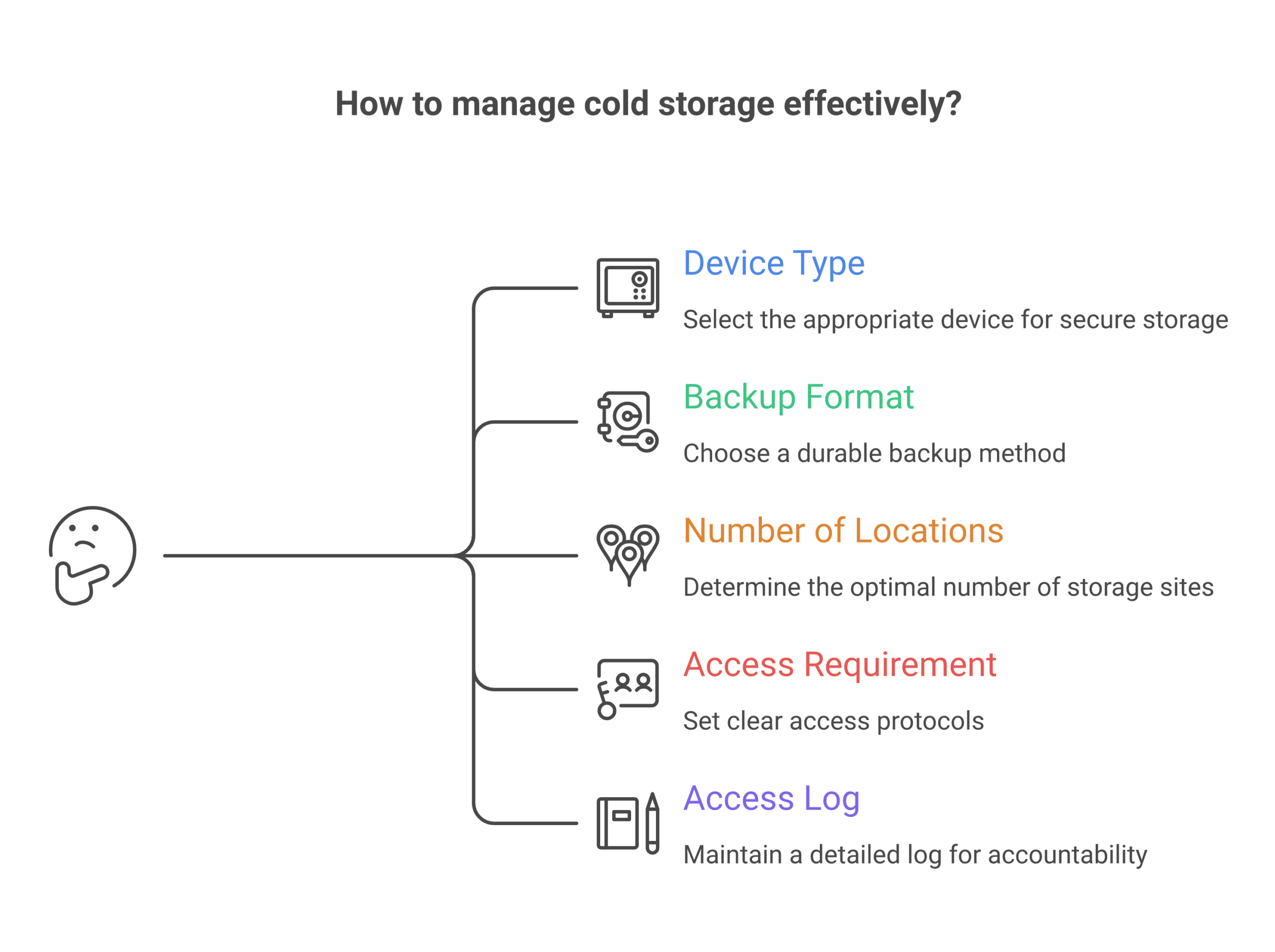 | Item | Your rule example |
| — | — |
| Device type | Ledger wallet, Trezor wallet, or HSM |
| Backup format | Steel plate plus paper copy |
| Number of locations | 3, in 2 cities |
| Staff needed to access | 2 of 4 named roles |
| Log needed for each access | Yes, signed and stored with finance files |
Treat this table as living “proof wallets” of your policy in action.
Multi person control: no solo heroes
Cold storage should never rely on one “crypto hero” in the team.
Use controls like:
- Two key holders per location
- Two signers for any move out of cold storage
- Extra review for “new address” sends
These ideas match long standing security norms like split knowledge and dual control in payment systems, where no one person can expose or use a key alone.*
If you mix in MPC or threshold schemes later, try to mirror the same pattern, such as “HR plus Finance must both approve” for a large cold move.
Moving funds in and out of cold storage
Every org will need to move funds:
- Into cold storage from a hot or MPC wallet
- Out of cold storage to cover spends or client flows
Define both paths clearly.
Into cold
- Only from known, labeled “staging” wallets
- Use test sends first, even for known paths, such as from Luno to hardware wallet
- Never from random sites like “bitcoin faucets direct to wallet” offers
Out of cold
- Simple form that explains why you need the move
- Clear source and target wallets, such as “main cold 1” to “treasury MPC 1”
- Review by at least two roles, not just one signer on a device
This also helps if you ever need to show an auditor that your flows are not just one person doing what they want.
Disaster and “what if” planning
Cold storage plans fail most often when life changes.
Plan ahead for:
- Lost or broken devices
- Test a full restore from seed at least once a year on a spare device
- Staff who leave or change roles
- Rotate who can access safes
- Remove old staff from all records and logs
- Change of country or law
- Some places may treat certain cold setups as “custody”
- Make sure legal and compliance know how keys are stored
NIST key management advice talks about planning for full key life cycles, not just the start, and that includes retirement and recovery steps.*
Do small, planned tests, such as:
- “Pretend this safe is flooded, can we still reach funds”
- “Pretend this one signer is sick for a month, can we still rotate keys”
Write down what you learn and fix weak spots.
Keeping cold storage human friendly
Cold storage work feels scary for many staff. The words are strange. The stakes are high.
You can make it easier if you:
- Use short, clear, low tech language in all scripts
- Break big steps into checklists staff can follow slowly
- Share simple stories of “what went wrong at other firms” so the rules feel real
If you need help writing that kind of plain content, the free Clicks and Trades newsletter is built exactly for this kind of training support. You can lift ideas, examples, and small “shield first” tips straight into your own playbooks.
When your org is ready to build full key ceremonies, backup rules, and recovery drills around your cold storage and hardware wallet crypto stack, not just one off fixes, you can Sign Up to get more structured checklists and lesson plans you can share across teams.
Implementation Playbooks by ICP: Exchanges, Advisors, HR/Sec, and Web3 Teams
You can have the best hardware wallet crypto stack in the world and still lose money if people do not know how to use it in their real work.
So instead of one big “security talk”, build simple playbooks for each group. Tie your lessons to the tools they already touch, like a Phantom wallet, a crypto.com wallet, or a ledger wallet. Training that fits real tasks works better and also shows clear return on investment in lower risk and fewer tickets.[^roi]
[^roi]: For example, focused security awareness training is linked to real cost savings when it cuts ransomware and other incidents.
1. Crypto exchanges and consumer platforms
Who: Product, CX, compliance teams on an exchange, app, or site that lists in the top 10 crypto wallets.
Main devices and flows:
- Sign up and first deposit
- “How to use a crypto wallet” help pages
- “Luno to hardware wallet” or “exchange to cold wallet crypto” sends
- Built in hot wallets plus links out to hardware wallet crypto options
Make learning “just in time”:
- Add short, plain tips into flows, such as:
- “Moving to a ledger nano x crypto wallet or trezor wallet? Test with a tiny send first.”
- “Never use ‘bitcoin faucets direct to wallet’ sites. Most are scams.”
- Use pictures that show real screens from your app, not generic art
- Give users a simple one page “cold storage starter” that explains why seeds stay off laptops
Cut tickets with better answers:
- Turn your top 20 support questions into short guides and mini drills
- For example, a “proof wallets” guide that helps users spot fake support staff who ask for a seed
- Link to a friendly, deeper source like the free Clicks and Trades newsletter for users who want step by step safety tips
This kind of focused teaching also shows regulators that you are taking user protection and crypto crime risk seriously.[^crime]
[^crime]: The 2026 crypto crime data shows scams and user mistakes are still a big share of losses, which puts pressure on platforms to improve education and controls.
2. Financial advisors and wealth managers
Who: Planners who now see client funds in a nano ledger x, a crypto wallet trezor, a tangem wallet, or even a “best hardware wallet safemoon” type device a client picked in 2021.
Main devices and flows:
- Client comes in with “my best wallet” and no backup
- Reports that list crypto right beside stocks and cash
- Estate and tax planning that must cover seed phrases
Simple playbook ideas:
- A 15 minute client script:
- Check if the client has any backup at all
- Help them move funds from a hot wallet, like a Phantom wallet, into a cold wallet crypto setup
- Explain, in very plain words, why the seed should never be typed on a phone
- A short, branded “safe wallet checklist” that your firm gives to every client who uses a ledger wallet or trezor wallet
- Clear policy that staff never touch client devices or seeds, only teach and watch
Advisors can lean on outside, non technical guides like Clicks and Trades so they do not need to write every explainer from scratch.
3. HR and security teams in normal companies
Who: HR, IT, and security in firms where staff trade or hold crypto on the side.
You do not control staff hardware wallet crypto setups at home, but their risky habits still matter for your wider security and brand.
Playbook goals:
- Fold crypto safety into normal security training
- Use the same calm tone as you use for phishing drills and password tips
- Show that “home” wallet mistakes can spill into work through reused passwords, fake apps, and malware
Practical steps:
- Add one short module that covers:
- Why a cold wallet crypto key stays off work laptops
- How fake support chats trick staff into sharing seeds
- Why “best hardware wallet 2021 uk” blog posts are not always good 2026 advice
- Run a yearly tabletop drill: “An employee lost funds, now attackers try the same tricks on work accounts”
- Offer a simple benefit, like links to beginner friendly lessons from Clicks and Trades, so staff feel helped, not blamed
Security awareness work like this is not just “nice to have”. It is now a clear part of many cyber rules for financial and tech firms, and it shows you tried to lower risk with training, not only tools.[^reg]
[^reg]: Recent financial sector rules stress user and staff awareness as a key control, not a side item, when firms deal with digital assets and online fraud.
4. Web3 teams, DAOs, and protocol builders
Who: Core teams who run a channel wallet for payments, a treasury MPC wallet, and one or more hardware wallet crypto devices for long term funds.
They often have strong code habits but weak training for non core contributors and community.
Key playbook pieces:
- “Signer school” for people who touch the cold wallet crypto or treasury
- Short “how to use a crypto wallet safely” guides for moderators who help others with wallet issues
- Clear rules for which funds live in a Phantom wallet or channel wallet and which must sit on a hardware device
Role based drills:
- Run a quarterly “treasury move” drill on test funds
- Have new signers practice a full cycle: request, review, test send, final send
- Let support and community teams walk through fake scam tickets so they learn how to answer fast and in plain words
Here, tailored education does two big things. It stops private key mistakes, and it shows your community that your project treats security and treasury care as core parts of the mission, not side work.
If you want help turning these ideas into simple, copy paste playbooks and checklists for your own users or staff, you can lean on the free Clicks and Trades newsletter as a steady stream of ready to use stories and scripts.
When your team is ready to roll this out across products, support, HR, and Web3 ops, you can also Sign Up to get structured lesson plans and shield first training you can plug right into your own docs and flows.
Vendor Selection & RFP: What to Ask, How to Verify, and When to Walk Away
You are not just picking a gadget or an app. When you choose a hardware wallet crypto vendor, you pick a long term partner for your users’ money.
So your RFP and vendor checks need to go past “cool features” and into trust, proof, and support.
Below is a simple, copy paste ready checklist you can use with any vendor, from a ledger wallet or trezor wallet maker to a new MPC or channel wallet platform that links to your phantom wallet, crypto.com wallet, or other top 10 crypto wallets.
1. Trust but verify: questions that need proof
Ask clear questions, then ask for proof in writing.
Security design and audits
- “Who audits your code and hardware, and how often?”
- Ask for recent third party reports, not just a logo slide
- “Do you have independent reviews of your key protection model?”
- For example, how your cold wallet crypto device or MPC wallet keeps keys split or offline, since MPC setups that split keys into parts can remove single points of failure and raise security when done well.[^mpc]
Build process and firmware
- “Describe your secure build pipeline from code to shipped device”
- Look for signed firmware, strong access controls, and a clear change log
- “Is your firmware reproducible or at least build repeatable?”
- If they say no, ask why, and how you can still check that a ledger nano x crypto wallet or tangem wallet runs the same code they show in audits
- “How fast do you ship critical security fixes?”
- Ask for a real example from the last year
Data, privacy, and compliance
- “What data do you collect from devices or apps, and why?”
- “How do you support AML and sanctions needs without tracking every move?”
- This matters more in 2026, as crypto firms now face tougher rules on customer checks and monitoring.[^compliance]
You are not trying to catch them in a trick. You just want to see if they can explain their model as clearly as you explain how to use a crypto wallet to your own users.
2. Supportability: can you run this for 5+ years?
Pretty dashboards will not save you if users cannot recover funds, or if your team cannot keep up with tickets.
In your RFP, rate vendors on:
Recovery and “oh no” flows
Ask to see full flows for:
- Lost device but seed is safe
- Lost device and seed is gone
- Lost phone for an app that controls a nano ledger x or ledger nano x crypto wallet
- Panic moves, like “luno to hardware wallet” after a scare
Ask for screenshots and sample copy. Check if the steps are short, clear, and match the plain style you want in your own “proof wallets” guides.
Docs, training, and handoffs
- “Show us your admin and user docs for:
- First setup
- Seed backup
- Safer sends, such as a test send before moving large sums
- “Do you offer white label or co branded guides we can plug into our own flows?”
- This is key if you want help your users move from a hot phantom wallet into a safer cold wallet crypto setup without writing every word yourself
- “What training do you give our support and compliance teams?”
- Live sessions, videos, or drills all help, as long as they are simple
If their docs read like a “best hardware wallet 2021 uk” blog that has not been touched since 2021, be careful. In 2026, hardware wallet crypto tools, unified wallets, and MPC setups are changing fast, and stale advice is a risk.[^topwallets]
One way to keep guidance fresh is to pair vendor docs with an outside, beginner friendly source, such as the free Clicks and Trades newsletter, so your team and users always have new, clear stories and checklists to lean on.
3. Walk away signs: when “no” is the safest choice
If you see these signs during RFP talks or pilot tests, treat them as bright red flags.
Red flag 1: “Trust us, we are secure” with no detail
- No recent third party audit reports
- No clear answers on how keys stay safe on device or in MPC
- Vague claims that sound like marketing, not like the concrete audit trends reviewers look for in 2026.[^audits]
Red flag 2: Weak support for real users
- No tested flows for “I lost my device” or “I clicked a bad link”
- Docs that assume every user is an engineer
- No clear path to teach users how to move funds safely between a hot app and a hardware wallet, or how to avoid obvious scam tricks like “bitcoin faucets direct to wallet”
Red flag 3: Poor incident history or slow fixes
- Past hacks or big outages with little public post mortem
- No timeline for how they ship patches to hardware devices and apps
- No plan for quick, plain language alerts if something breaks
If more than one of these shows up, you do not need drama. Just thank them, write a short note on why they did not fit, and move on.
There is strong growth in the hardware wallet market and in new MPC and unified wallet options, so in most cases you will have other vendors to pick from.[^market]
4. Make vendor checks and training part of one plan
Your RFP is not just a checklist. It is the start of how you will teach staff and users to work with any new ledger wallet, crypto wallet trezor, MPC treasury, or secrid wallet style card that links into your flows.
So as you test vendors:
- Run a small tabletop drill with each one, such as “support helps a user move funds from exchange to cold storage”
- Check if your team can follow the docs without help
- Note where you will add your own scripts, stories, and mini lessons
If you want ready made stories and scripts to plug into those flows, you do not need to build it all yourself. You can lean on the free Clicks and Trades newsletter to give your teams and users simple, step by step crypto safety tips that match whatever hardware wallet crypto stack you pick.
When you are ready to fold vendor selection, playbooks, and shield first training into one clear program across product, support, HR, and Web3 ops, you can also Sign Up to get structured lesson plans your teams can plug straight into real screens and real work.
[^mpc]: See the comparison of MPC wallet security models that explains how splitting keys can remove single points of failure and support easier recovery when designed well, in “Top MPC Crypto Wallets Compared for Security and Features.”
[^compliance]: For a view of how 2026 rules push stronger controls and user checks for crypto platforms, see “Crypto compliance in 2026: AML, sanctions and what’s ahead.”
[^topwallets]: For current trends across hot, cold, and unified wallet designs in 2026, see “Top 10 Crypto Wallets in 2026.”
[^audits]: For how audit reports and proof style checks shape trust in crypto systems in 2026, see “7 Crypto Audit Industry Predictions for 2026.”
[^market]: For current data on how fast the hardware wallet market is growing and why more options now exist, see “Hardware Wallet Market Size, Share and Analysis, 2026–2033.”
Summary
This article explains why crypto wallet choices have become a critical risk management issue for organizations in 2026, even for businesses that never directly handle cryptocurrency themselves. It covers the full spectrum of wallet types—hot, cold, custodial, non-custodial, hardware, and MPC—and shows how poor user wallet practices lead to costly support tickets, fraud claims, compliance headaches, and reputation damage. The guide walks through wallet fundamentals such as private keys, seed phrases, addresses, and custody models, then provides detailed technical breakdowns of hardware wallet architecture, software wallet risks, and enterprise-grade cold storage procedures. It also offers practical implementation playbooks tailored to exchanges, financial advisors, HR and security teams, and Web3 projects, along with a vendor selection framework that includes RFP questions, red flags, and verification steps. By the end, readers will understand how to match wallet security models to real-world risk, build clear policies and training programs, and turn wallet education into measurable ROI through reduced incidents and stronger user trust.